

If you've ever tried to export Twitter followers, you've probably noticed that most tools ask you to log in with your Twitter account or install a browser extension.
But what if you don't want to risk your account? What if you just want a quick, anonymous export?
Good news: You can export Twitter followers without logging in. In this guide, I'll show you exactly how—and why it matters for your privacy and security.
Why Do Most Tools Require Twitter Login?
Before we get to the solution, let's understand the problem.
Many Twitter export tools require you to:
1. Authorize via Twitter OAuth — This gives the tool access to your account
2. Install a browser extension — These extensions scrape data while you browse
The Risks of Logging In
While some of these tools are legitimate, there are real risks:
Account suspension
Twitter may flag your account for using unauthorized tools
Data access
OAuth often grants more permissions than you realize
Privacy exposure
Your account activity may be logged by the tool
Extension vulnerabilities
Browser extensions can be security risks
If you're just trying to export a competitor's follower list for research, why should you have to put your own account at risk?
Step-by-Step: Export Without Login
Step 1: Open ArchivlyX Twitter Follower Exporter
Step 2: Enter the Twitter username or profile URL of the account you want to export
Step 3: Choose how many followers to export
Step 4: Click "Export" and download the CSV or Excel file
That's it. No login. No extension. No risk to your own account.
Export Twitter Followers Anonymously — Try It Free
No login. No extension. No tracking.
Export Twitter Followers Now → https://www.archivlyx.com/twitter-exporter/export-twitter-followers
Download any public account's follower list to CSV or Excel in minutes.
Benefits of No-Login Twitter Export Tools
Using a tool that doesn't require a login isn't just about convenience—it's about safety and flexibility.
1. Protect Your Twitter Account
When you don't connect your account, there's zero risk of suspension or flagging. Twitter has no idea you're exporting data.
2. Stay Anonymous
Your export activity leaves no trace. The target account won't know you exported their followers, and your own account isn't involved at all.
3. Works on Any Device
Web-based tools work on desktops, laptops, phones, or tablets. No need to install anything, which also means no compatibility issues.
4. Export Any Public Account
You're not limited to your own followers. Export the follower list of competitors, influencers, brands—anyone with a public profile.
What About Exporting Your Own Followers?
If you want to export your own Twitter followers, you have two options:
- Option 1: Twitter's Official Archive
You can request a data archive from Twitter, which includes your followers. But:
• It takes hours (sometimes days) to process
• The format is raw JSON, not CSV
• It's not easy to work with
- Option 2: Use ArchivlyX (Still No Login Needed)
Even for your own account, you can just enter your username into ArchivlyX and export. It's faster and gives you a clean CSV file.
Export Followers vs. Following: What's the Difference?
People sometimes confuse these two, so let's clarify:
- Export Type
- What You Get
- Best For
Followers
People who follow an account
Audience analysis
Following
Accounts that person follows
Competitor research, finding influencers
ArchivlyX supports both:
• Export Twitter Followers
• Export Twitter Following List
FAQ: Exporting Twitter Followers Without Login
Is it really possible to export followers without logging in?
Yes. ArchivlyX accesses only publicly available data from public profiles. No authentication is needed because the data is already public.
Is this safe and legal?
ArchivlyX only collects publicly available information. No private data is accessed, and no terms of service are violated on your end since you're not authorizing any account access.
Can I export followers from a private account?
No. Private accounts' followers are not publicly visible, so no tool can export them without authorization.
What data is included in the export?
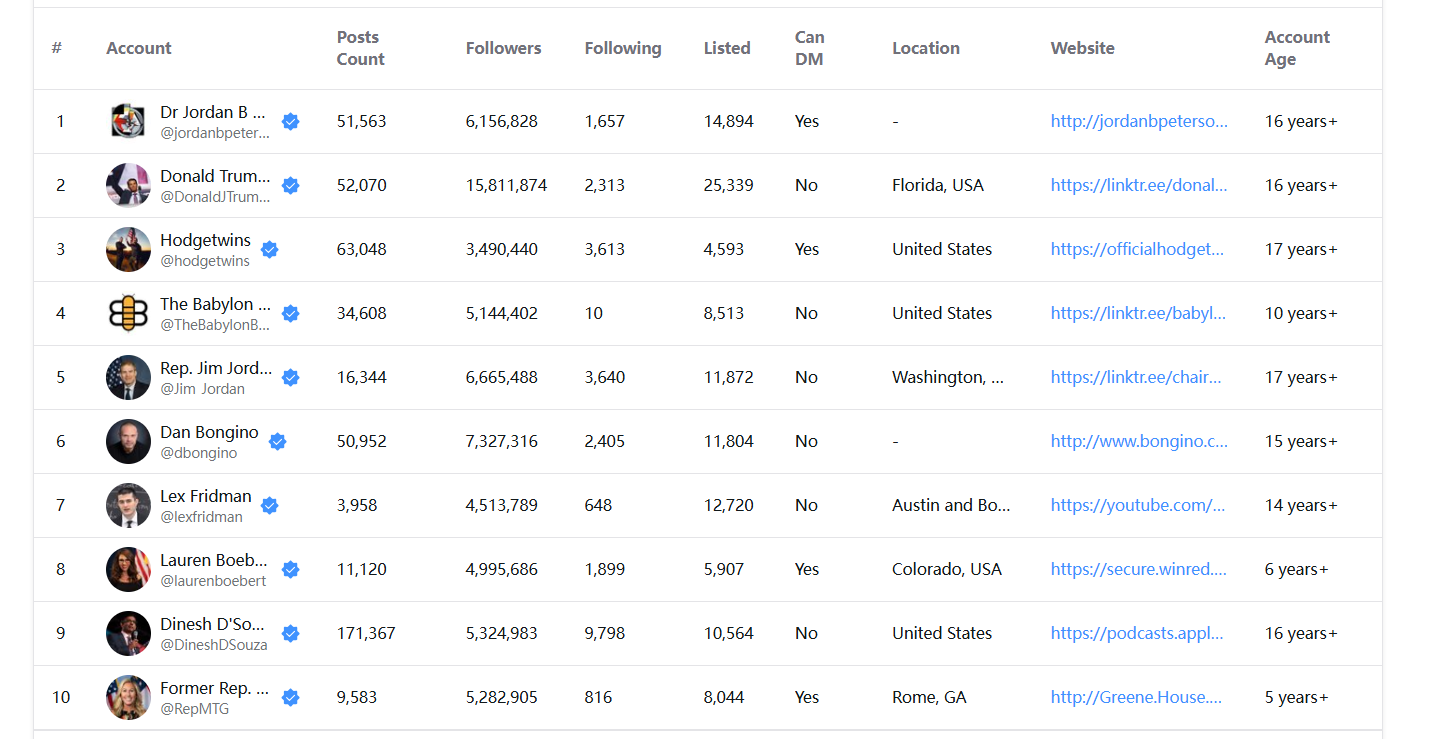
The exported file includes: username, display name, bio, follower count, following count, verified status, account age, and DM availability.
Does this work with X (Twitter's new name)?
Yes. ArchivlyX supports both x.com and twitter.com URLs.
Export Twitter Followers Without Login — Start Now
You shouldn't have to risk your own Twitter account just to export someone else's public follower list.
With ArchivlyX, you can:
• Export any public account's followers
• Download clean CSV or Excel files
• Stay 100% anonymous
• Work from any device
No login. No extension. No hassle.
→ Export Twitter Followers Now (No Login)


