

We’ve all been there. You get a notification, check your follower count, and see an account that just looks…off. Maybe it’s a bot, maybe it’s a spam account, or maybe it’s just someone you’d prefer didn’t have a front-row seat to your tweets anymore.
Whatever the reason, curating your circle is healthy. You have the right to decide who sees your content.
This guide walks you through the exact steps to remove a follower on Twitter (X) via the web. Plus, we’ll look at how to handle a bigger cleanup without losing important data.
Why Bother Removing Followers?
It’s not just about being picky. There are practical reasons to prune your list:
- Bot Cleanup: Keeping your engagement ratio healthy by removing fake accounts.
- Privacy & Safety: Soft-blocking people you don't want interacting with you without the drama of a hard block.
- Feed Quality: Ensuring your community actually reflects the people you want to talk to.
Can you do this directly on Twitter? Absolutely. Twitter (X) calls this "Removing this follower," and it’s a softer alternative to blocking.
How to Remove a Follower on Twitter
You have two easy ways to do this depending on whether you are looking at a list or a specific profile.
Method 1: The "List" Approach
If you are scrolling through your audience to spot bad actors, use this method.
- Open Twitter in your browser and go to your Profile.
- Click on your Followers count to open the full list.
- Find the account you want to drop.
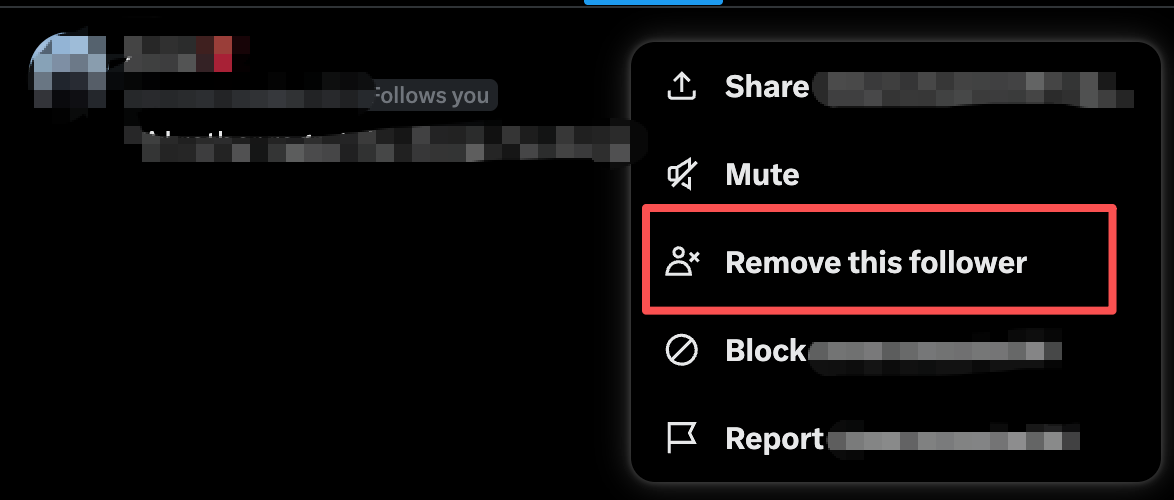
- Click the three-dot menu icon next to their name.
- Select Remove this follower.
- Hit Remove to confirm.
Method 2: The "Profile" Approach
If you are already looking at a suspicious profile and decide they need to go:
- Go to that user’s profile page.
- Click the three-dot menu icon (usually next to the message or follow button).
- Select Remove this follower.
- Confirm the action.
Pro Tip: If you are doing a mass cleanup, keep your main Followers list open in one tab and open suspect profiles in new tabs. It saves you from losing your place in the scroll.
Smart Step: Back Up Before You Purge
Removing a follower is instant, but sometimes it’s too permanent. Once they are gone, you lose track of who they were. This can be a problem if you are managing a brand account and need to report spam rings later, or if you just want a record of who you’ve removed for safety reasons.
Before you start clicking "remove" on dozens of accounts, it is smart to export your current data.
You can use the ArchivlyX Twitter Exporter to download your full follower list into a CSV or Excel file. The best part? It works on public accounts and organizes the data for you.
Here is why a backup helps:
- Audit Trail: Keep a record of "bad actors" you removed in case they return under new names.
- Safe Cleanup: You can filter the list in Excel first to mark who needs to go, rather than guessing on the fly.
Bonus: The Other Side of the Coin (Cleaning Who You Follow)
Now that you’ve cleaned up who is watching you, it’s time to look at the other side of account hygiene: who you are watching.
Often, if your follower list is full of bots, your "Following" list might be cluttered too. A messy timeline kills your Twitter experience. But unfollowing people one by one is tedious, and it's hard to tell which accounts are actually low-quality just by looking at a profile picture.
This is where advanced tools come in handy.
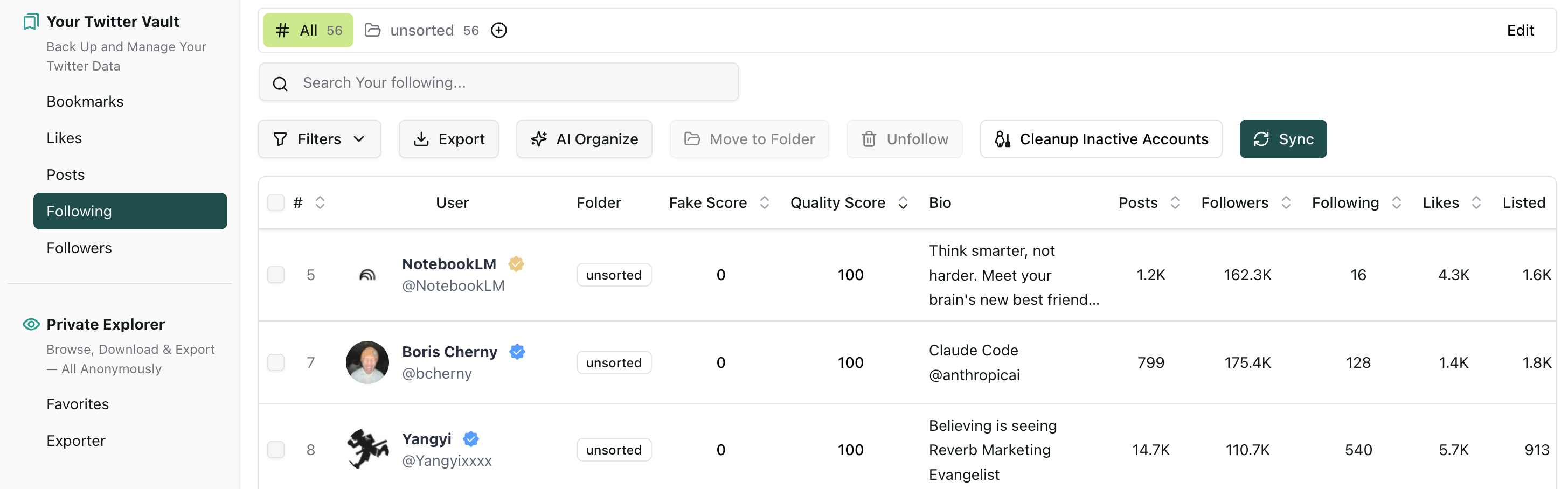
ArchivlyX offers a specific feature for this called the Following Management Vault. It analyzes the accounts you follow and assigns them a "Fake Score" and "Quality Score."
How to deep clean your timeline:
- Go to the ArchivlyX Following Manager
- You’ll be prompted to install the browser extension—this is necessary to securely analyze your specific following list.
- Once synced, sort your list by Fake Score.
- Use the bulk actions to Unfollow or Cleanup high-risk accounts in batches.
By combining these two steps—removing unwanted followers and cleaning up your following list—you essentially reset your Twitter account’s health without having to start over from scratch.
FAQ: Common Questions on Follower Removal
Can I remove a follower without blocking them?
Yes. The "Remove this follower" feature (also known as a Soft Block) forces them to unfollow you without blocking them permanently. They won’t be notified.
Can they follow me again?
Yes. Since you haven't blocked them, they can follow you again if they notice they aren't following you anymore. If they persist, a Block is your best bet.
Does removing followers hurt my account?
Actually, it usually helps. Removing inactive or bot followers improves your engagement rate, which is a positive signal to the algorithm.
Take Control of Your Account
Whether it’s one annoying account or a hundred spam bots, you now have the tools to handle it. Start by removing the unwanted followers via the web steps above, but don't forget to look at the bigger picture.
Ready to get serious about account hygiene? Start by exporting your lists with ArchivlyX to ensure you’re cleaning up safely and strategically.


