

Want to know who a competitor, influencer, or brand is paying attention to on Twitter? Exporting the following list is the fastest way to find out.
Whether you're doing competitor research, building outreach lists, or just curious about someone's interests, having a downloadable list of who they follow can save you hours of manual scrolling.
In this guide, I'll show you exactly how to export a Twitter following list in 2026—step by step, with a free tool that doesn't require a login or browser extensions.
Why Export a Twitter Following List?
Before we dive into the how, let's talk about the why. A Twitter following list is more than just a list of usernames—it's a window into someone's interests, strategy, and network.
Here's why people export following lists:
1. Competitor Research
Want to know what competitors are paying attention to? Export their following list and you'll see:
• Which industry leaders they follow
• What news sources they track
• Which tools and platforms they use
This gives you insight into their content strategy without them ever knowing.
2. Find Influencers and Partners
Looking for collaboration opportunities? Export the following list of accounts in your niche. You'll often find:
• Micro-influencers worth partnering with
• Journalists who cover your industry
• Potential affiliates or brand ambassadors
3. Build Outreach Lists
If you're doing PR, link building, or sales outreach, the following list is gold. Export it, filter by follower count or verification status, and you've got a ready-made prospect list.
4. Understand Content Themes
By analyzing who someone follows, you can understand what topics they care about. This is useful for:
• Planning content that resonates with a specific audience
• Identifying trending voices in a niche
• Spotting patterns across multiple accounts
Can You Export a Following List Directly from Twitter?
Short answer: No.
Twitter (now X) does not offer a native way to export following lists—especially for accounts other than your own.
You can request a data archive of your own account, but:
• It only includes your own data
• The format is raw JSON (not user-friendly)
• It doesn't include other accounts' following lists
That's why most users rely on third-party tools to export the following lists in a clean, usable format like CSV or Excel.
How to Export Twitter Following List with ArchivlyX (Step-by-Step)
The easiest way to export any Twitter following list in 2025 is with ArchivlyX's Twitter Following Exporter. It's web-based, requires no login, and works on any device.
Here's how to do it:
Step 1: Go to the Export Tool
Open ArchivlyX Twitter Following Exporter in your browser. You don't need to create or log in.
Step 2: Enter a Twitter Username or URL
Paste the Twitter profile URL (like https://x.com/username) or enter the username/handle of the account whose following list you want to export.
Step 3: Let the Tool Fetch the Data
ArchivlyX automatically collects the list of accounts that the profile is following. Depending on the size of the list, this may take a few seconds to a few minutes.
Step 4: Download Your CSV or Excel File
Once the data is ready, click the export button and choose your preferred format:
• CSV — Universal format, works with Google Sheets, Excel, Airtable, and more
• Excel (.xlsx) — Native Excel format with better formatting support
That's it. You now have a clean, structured list of everyone that the account follows.
Ready to Export a Twitter Following List?
Try it now — no login required.
Export Twitter Following List → https://www.archivlyx.com/twitter-exporter/export-twitter-following-list
Paste any public Twitter username and download the following list in CSV or Excel format.
What Data Is Included in the Exported File?
ArchivlyX doesn't just give you a list of usernames. The exported file includes rich profile data that makes analysis much easier:
- Username
The @handle of the account
- Display Name
The name shown on the profile
- Bio
The account's bio/description
- Follower Count
How many followers do they have
- Following Count
How many accounts do they follow
- Verified Status
Whether the account is verified
- Account Age
When the account was created
- DM Availability
Whether DMs are open
This data lets you filter and prioritize accounts based on what matters to you—whether that's influence (follower count), credibility (verification), or engagement potential.
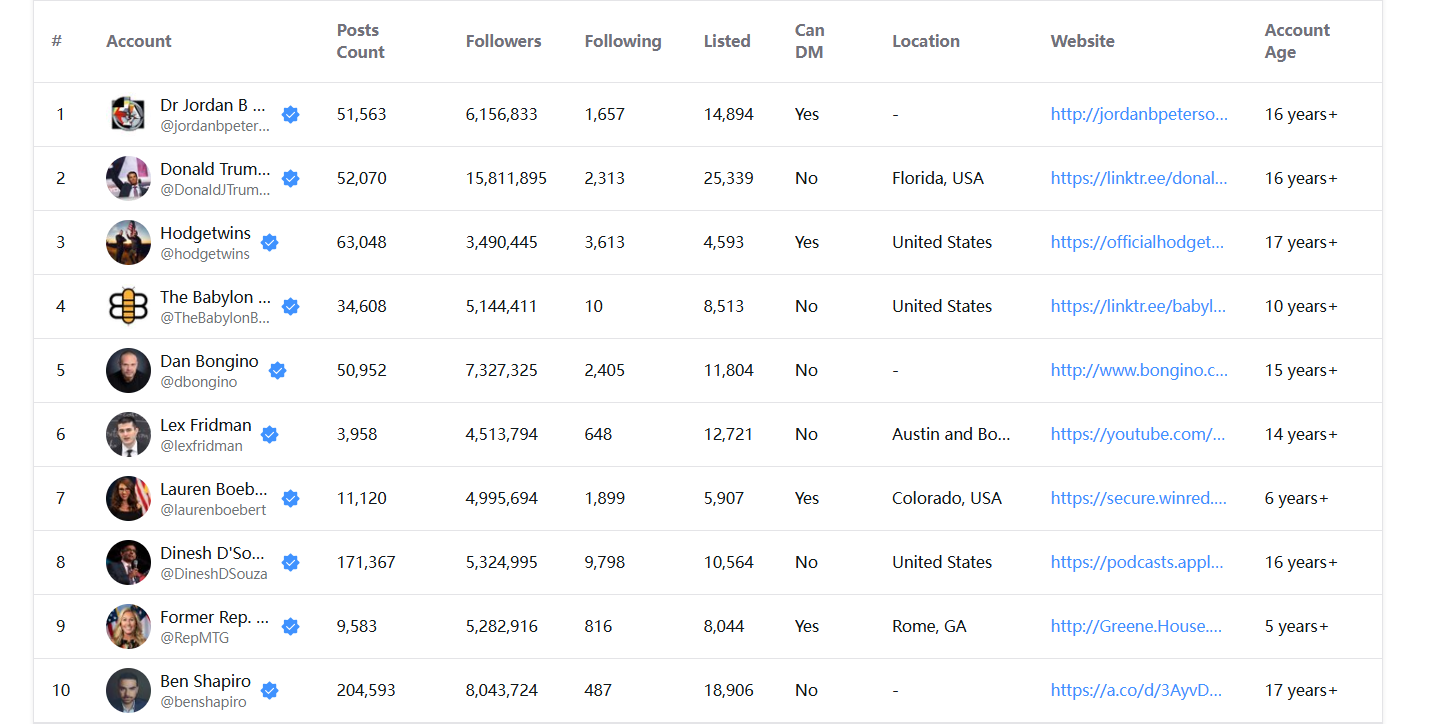
5 Ways to Use Your Exported Twitter Following List
Now that you have the data, here's how to put it to work:
1. Import into a CRM for Outreach
Export the CSV and import it into tools like HubSpot, Notion, or Airtable. Add notes, track outreach status, and manage follow-ups all in one place.
2. Filter by Follower Count in Excel
Open the file in Excel or Google Sheets and sort by follower count. This helps you identify high-value accounts worth engaging with first.
3. Find Overlap Across Multiple Accounts
Export the following lists of 3-5 competitors or industry leaders. Then use Excel's VLOOKUP or FILTER functions to find accounts that appear on multiple lists—these are the "must-follow" voices in your space.
4. Identify Journalists and Media
Filter by bio keywords like "journalist," "editor," "writer," or specific publication names. This is a quick way to build a PR media list.
5. Analyze Content Strategy Patterns
Group the accounts by category (tools, creators, news, etc.) and you'll start to see patterns in what content themes the original account cares about.
FAQ: Exporting Twitter Following Lists
Can I export a Twitter following list without logging in?
Yes. ArchivlyX is a fully web-based tool that doesn't require you to log in or authorize your Twitter account. Your export activity is completely anonymous.
Is it free to export the following list?
ArchivlyX offers a free tier that lets you export a portion of any following lists. For full exports of large accounts, a paid plan is available.
Does this work on mobile?
Yes. Since ArchivlyX is web-based, it works on iPhone, Android, tablets, and desktop browsers—no app installation needed.
Can I export someone else's following list?
Yes, as long as their account is public. ArchivlyX works with any public Twitter/X account, not just your own.
What formats can I download?
You can download the following list in CSV or Excel (.xlsx) format.
Export Any Twitter Following List — Start Now
Manually scrolling through someone's following list isn't scalable. Whether you're doing research, building outreach lists, or analyzing competitors, exporting the data is the only practical approach.
With ArchivlyX, you can export any public Twitter following list in minutes—no login, no extension, no hassle.
→ Export Twitter Following List Now


