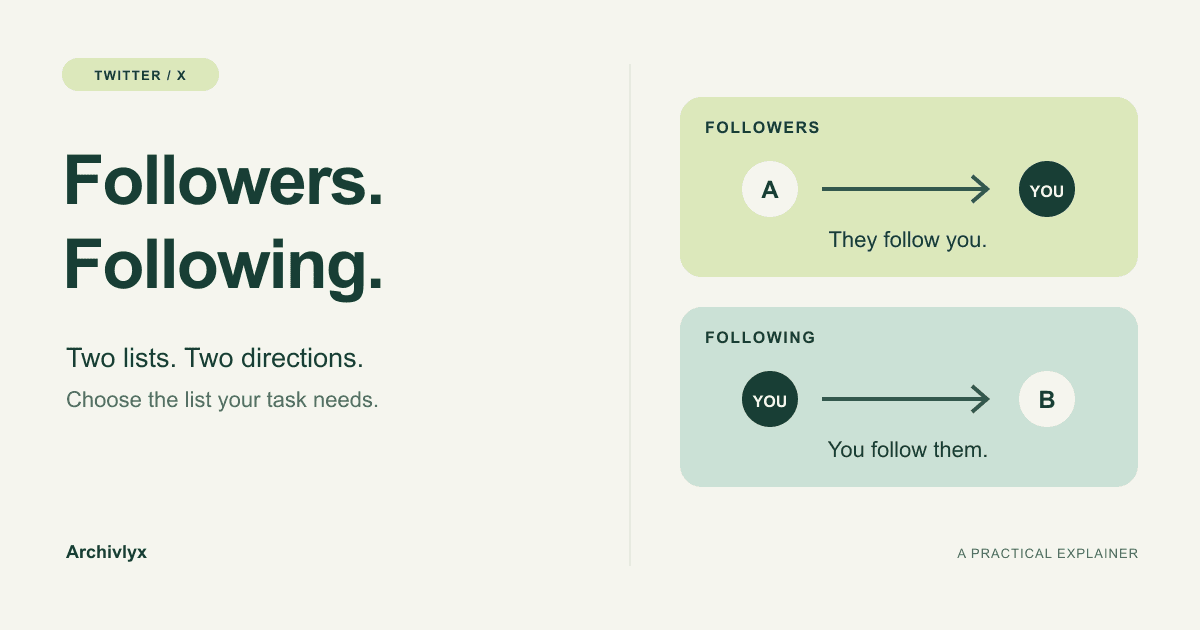
Your followers are the accounts that follow you. Your following list contains the accounts you follow. On someone else's profile, read both labels from that person's point of view: their followers follow them; their following list shows whom they follow.
That distinction matters before you export a list. If you want a starting point for researching the accounts someone follows, choose their following list. If you're studying that person's audience, choose their followers. The same username can lead to two very different sets of accounts.
Follow the direction
Imagine you follow a photographer called Alex. Alex appears in your Following list, and you appear in Alex's Followers list. Alex appears in your Followers list when Alex also follows you.
A mutual follow is both directions happening between the same two accounts. The totals on a profile won't tell you which accounts are mutuals; that takes a comparison of the account lists.
X's new user FAQ describes separate Following and Followers links on a profile. Open the relevant list first if you only need to inspect a few accounts. An export becomes useful when you want to keep the list, filter its fields, or work through more accounts than you can comfortably review on the page.
Choose a list for the question you're asking
Your question | Start with |
|---|---|
Who follows this creator or brand? | That profile's Followers list |
Which accounts does this researcher follow? | That profile's Following list |
Which accounts do I currently follow and want to find again later? | Your own Following list |
Which accounts follow me back? | Both lists for your own profile, compared account by account |
Suppose you're looking for accounts that NASA follows. Entering NASA and choosing Following gives you that outgoing relationship. Choosing Follower asks the reverse question: which accounts follow NASA? A result full of interesting accounts can still be the wrong input for your research.
For a source list, following is usually the useful starting point. It gives you accounts the profile has chosen to follow; inspect their profiles and recent work to decide whether they're useful sources. A follow is a connection to investigate, rather than evidence that someone reads or endorses everything an account posts.
For an audience question, start with followers. Keep the target handle with your notes so you can distinguish NASA's audience from your own when you return to the data.
Make the selection in Archivlyx
For public-account relationship lists, open the Twitter Exporter.
Choose Follower for accounts following the target, or Following for accounts the target follows.
Enter the public account's handle or profile URL. Check whose profile you entered, especially when you're researching someone else's account.
Select Export Now. Read the result heading and inspect a few accounts before moving on to an analysis.
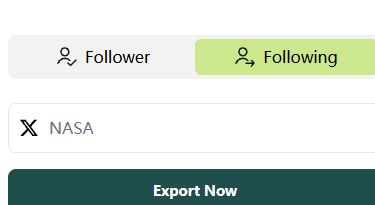
Following is selected before the NASA request. This is a current product capture, taken on November 4, 2026.
In our check, selecting Following for NASA opened the result below. Total Following identified the relationship; Export Incomplete and the upgrade prompt identified the result's scope. The screen displayed 67 exported against a total of 115.
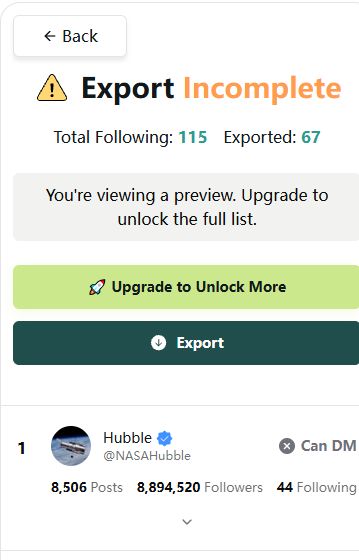
The actual preview keeps its incomplete status visible. The Hubble row underneath belongs to the selected Following result; it is not a complete downloaded list.
If you need a file, check your current Archivlyx account allowance and the result's completeness before proceeding. Sign in to Archivlyx if prompted; that is separate from authorizing an X account. Start from the dedicated followers export page or following export page when you already know which relationship you need.
Read the account row, too
The columns inside a result can cause a second mix-up. In NASA's Following preview, the row for @NASAHubble has its own Followers and Following counts. Those numbers describe Hubble's profile. In the capture above, they are 8,894,520 followers and 44 following.
The reason Hubble is in the result is the selected relationship: NASA → Hubble. Hubble's 44 following accounts are a different set. To inspect that set, make a separate Following request for NASAHubble rather than treating the number 44 as a count of NASA's connections.
Read the result in two passes:
The selected list explains the relationship between the target profile and each row.
The fields on a row describe the account on that row, including its own follower and following counts.
That separation matters when sorting or filtering an exported file in a spreadsheet. Sorting a NASA Following file by Followers would organize the accounts NASA follows by their own audience size. It would not switch the file into a list of NASA's followers. This guide demonstrates how to interpret the preview; spreadsheet sorting is a separate next step once you have the appropriate file.
Decide whether the result is complete enough
A partial preview can help you choose the right list and understand its fields. It can also give you a few accounts to inspect individually. A conclusion about the entire network needs more than those visible examples.
For example, if an account is missing from an incomplete preview, you cannot conclude that it is absent from the full list. Checking who follows you back requires both complete relationship lists for your own profile. Comparing a complete Followers file with a partial Following preview would mix scopes and could produce misleading non-matches.
The screenshot shows an Export button alongside the incomplete warning. Read the warning even when a button is available. Before calculating totals from a saved file, confirm which relationship it contains, check its row count and completeness, and remove duplicate accounts where needed. Keep any filtering you apply in your notes so a smaller working set is not mistaken for the original collection.
What a follower-to-following ratio tells you
A follower-to-following ratio divides the follower count by the following count. For example, 1,000 followers and 200 following gives a ratio of 5:1. These are illustrative numbers.
That calculation compares two totals. It doesn't identify mutual follows, show which accounts read the posts, or measure how useful a following list will be to your work. For this task, the more useful decision is which direction supplies the accounts you actually want to inspect.
Keep the label with the list
Before leaving a preview or saving a file, note the target handle, followers or following, the collection date, and whether the result was complete. A label such as NASA — following — 2026-11-04 — preview is easier to interpret later than a file called twitter-list.
Keep the list label separate from notes about individual accounts. “NASA following preview” names the collection; “Hubble: inspect its astronomy posts” names a possible next action. That small distinction keeps your research question attached to the data when you pick it up again.