

Few things are more frustrating than opening Twitter (or “X,” as it’s now called) only to be greeted with the dreaded message:
“Posts aren’t loading right now. Please try again later.”
You tap refresh. Nothing. You close and reopen the app. Still nothing. Suddenly, you’re cut off from the world’s most real-time conversation platform, and it feels like you’re missing out on everything—from trending memes to breaking news.
Don’t worry—you’re not alone. This is a fairly common issue, and in most cases, it’s easy to solve. Let’s dig into why this happens and the simple steps you can take to get your feed up and running again.
Why Does Twitter Say “Posts Aren’t Loading Right Now”?
Before we jump into fixes, it’s worth understanding what causes this error in the first place. Knowing the “why” makes it easier to troubleshoot quickly.
1. Internet Connection Issues
The most common culprit is your own internet connection. If your Wi-Fi is spotty or your mobile data is running weak, the app won’t be able to load tweets. Even a momentary drop in signal can trigger the error.
Pro tip: If other apps (like Instagram or YouTube) are also slow, your internet is the problem—not Twitter.
2. Twitter/X Server Outages
Yes, even tech giants stumble. Occasionally, Twitter/X experiences outages on their servers, which means posts won’t load for anyone—whether you’re on mobile, desktop, or the web app. Outages are rare, but they do happen.
To check if it’s a platform-wide issue, you can visit Downdetector or search hashtags like #TwitterDown on other social networks.
3. App or Browser Glitches
Software isn’t perfect. Sometimes the Twitter/X app just… acts up. Maybe it needs an update, maybe it’s storing too much cached data, or maybe your browser has a temporary hiccup. Glitches like these are annoying, but usually easy to fix.
4. Account or API Restrictions
Did you know Twitter/X has rate limits? If you refresh your timeline too often in a short period, you might temporarily hit a usage cap. Similarly, if there are temporary restrictions on your account (for security checks or unusual activity), you might see loading errors.
How To Fix “Posts Aren’t Loading Right Now” on Twitter
Seeing that “Posts aren’t loading right now” message is annoying—but the fix is usually simple. Think of this as your step-by-step troubleshooting playbook. Start with the easiest fixes and move down the list until your feed is back to normal.
Step 1: Check Your Internet Connection
Most of the time, the problem isn’t Twitter at all—it’s your connection.
Still curious about what you can and can’t see on X, like whether likes are visible? Check out this guide : How to See Someone’s Likes on Twitter (You Can’t—Here’s Why).
Try this:
- Toggle airplane mode on/off if you’re on mobile.
- Switch between Wi-Fi and mobile data.
- Restart your router if you’re at home.
- Run a quick speed test (Speedtest.net works well).
If your feed feels sluggish rather than completely broken, you may also want to read this: Why Is Twitter So Slow? Causes & Easy Fixes for 2025.
Step 2: Update or Reinstall the Twitter/X App
Bugs in outdated apps cause all kinds of headaches.
On mobile:
- Open the App Store/Google Play.
- Check for Twitter/X updates and install them.
- Still stuck? Delete the app, restart your phone, and reinstall it fresh.
This clears corrupted files and often works like magic.

Step 3: Clear Cache and Cookies
Old cached data can block fresh tweets from loading.
- Android:
Go to Settings → Apps → Twitter (X) → Storage → Clear cache.
- iOS:
No direct cache button—delete and reinstall the app instead.
- Web browsers:
- Open Settings → Privacy → Clear browsing data.
- Select Cookies and cached files, then hit clear.
After clearing cache, log back in and refresh your feed.
Step 4: Check if Twitter/X Is Down
Sometimes it’s not you—it’s them. Twitter/X servers do go down occasionally.
Here’s what to do:
- Visit Downdetector.com and search “Twitter.”
- Look for trending hashtags like #TwitterDown on other platforms.
- Follow @TwitterSupport for outage updates.
If it’s a server problem, the only fix is patience. Most outages are resolved within a couple of hours.
✨ Bonus Quick Fixes
If none of the above work, try these extra tricks:
- Log out and log back in.
- Restart your phone or computer.
- Try a different device.
- Disable VPNs or proxies that may block connections.
Quick Takeaway
When Twitter/X says “Posts aren’t loading right now,” don’t panic. Walk through these steps:
- Fix your connection.
- Update or reinstall the app.
- Clear cache and cookies.
- Confirm if Twitter is down.
Nine times out of ten, one of these will solve the issue—often in less than 10 minutes.
Try Archivlyx Twitter Viewer as an Alternative
So, you’ve tried all the fixes above and Twitter/X still isn’t cooperating—or maybe you just want a simpler way to browse public tweets without logging in. That’s exactly where Archivlyx Twitter Viewer comes in handy.
🌟 Key Features of Archivlyx
- No login required – You can view public tweets without signing into an X account.
- Profile & Tweet Viewer modes – Choose to browse an entire timeline or view a specific tweet.
- Lightweight & fast – Runs smoothly on both mobile and desktop browsers.
- Privacy-friendly – Great if you want to check tweets without leaving digital footprints.
📌 When Archivlyx Comes in Handy
Archivlyx isn’t meant to replace the official app, but it shines in certain scenarios:
- Quick checks – Want to open a tweet link but don’t feel like logging in? Just paste and view.
- Research & fact-checking – Perfect for journalists, marketers, and students analyzing public accounts.
- Casual browsing – Explore timelines on the go without clutter or distractions.
- Privacy-first viewing – Ideal if you’d rather not leave tracking data behind.
🚀 How To Use Archivlyx (Step by Step)
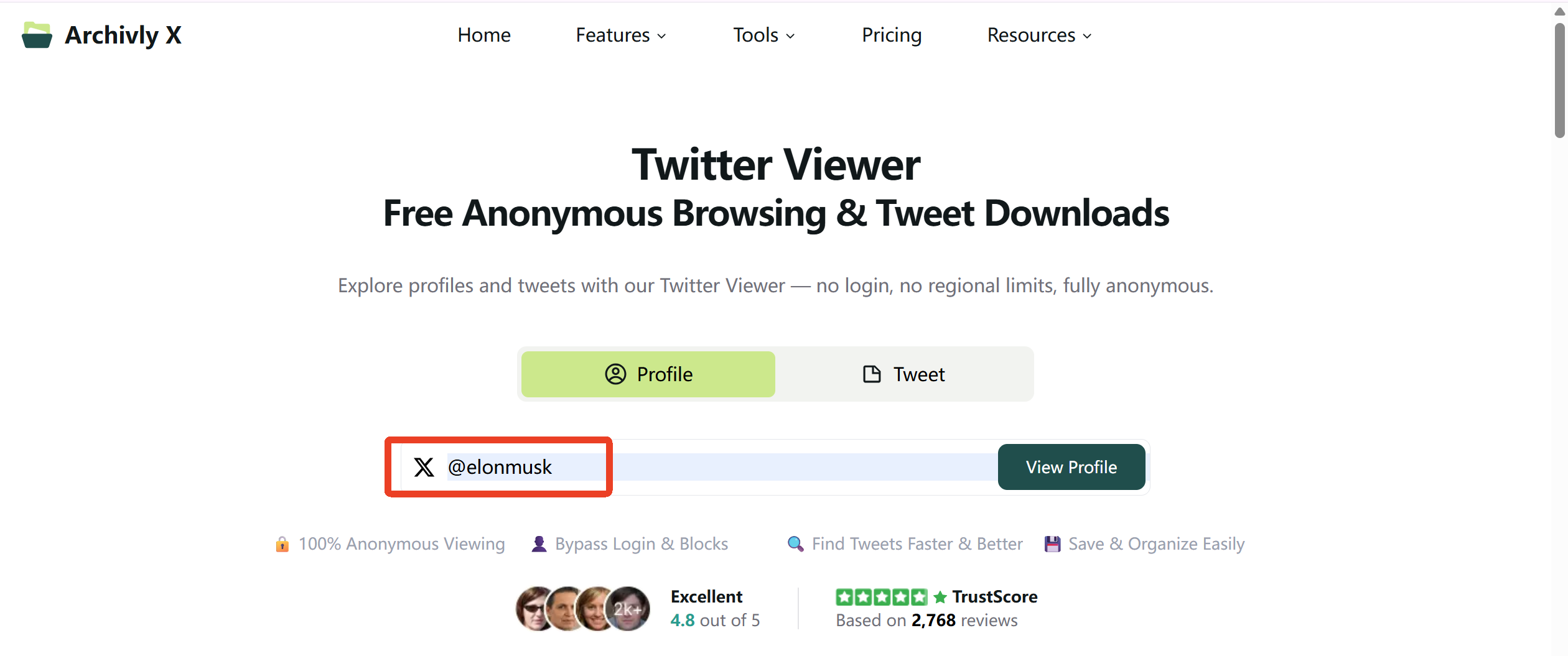
- Open the Archivlyx Twitter Viewer.
- Choose either Profile Viewer (to explore someone’s public timeline) or Tweet Viewer (to see a single post).
- Enter the username (like
@nasa) or paste a direct tweet link. - Browse instantly—no login, no setup, no hassle.
Note: Archivlyx only works with public accounts. If tweets are protected, no viewer can bypass that privacy setting.
Ready to give it a try? Head over to Archivlyx Twitter Viewer today and see how easy it is to browse public tweets without logging in.


