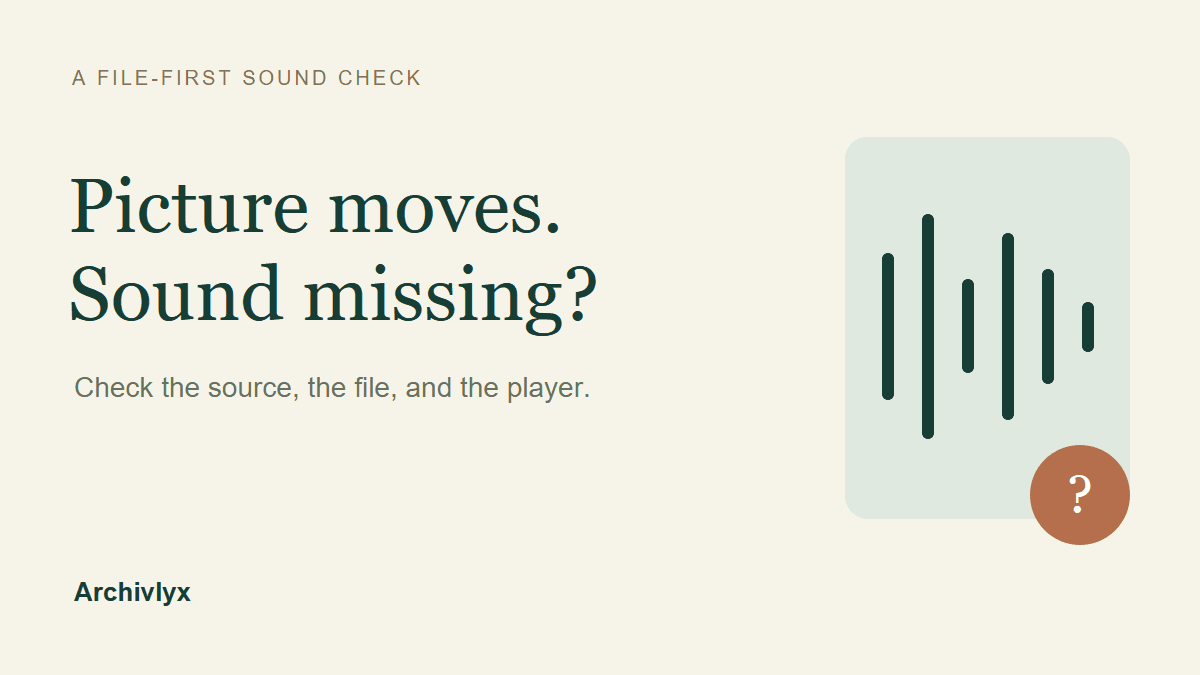
If a downloaded Twitter video has no sound, first unmute the player and check the original post. Then find out whether the saved file contains an audio track. A silent animation, a file with missing audio, and a player sending sound to the wrong output need different next steps. Downloading the same item repeatedly won't distinguish them.
We checked two real public posts: a NASA video about recording Ingenuity on Mars, and a short NASA Earth animation. Both moved on screen, but their saved files contained different streams. That small comparison is more useful than assuming every moving MP4 should have sound.
Separate the source, the file, and the player
Start with three quick checks, in this order:
Player: unmute the video, raise its own volume, and check your device's output. A Bluetooth headset or muted browser tab can make a working file seem silent.
Source: open the specific original post and play the relevant passage with sound enabled. Establish whether this item was meant to have audio before looking for something that may never have existed.
Saved file: open the actual download, not its thumbnail or a search preview. If it remains silent, inspect its streams or ask someone who can check the same file.
Keep the original link and filename together. If you switch between two similar posts or accidentally open an older download, a comparison can look like a failed save when you are checking different items.
The .mp4 ending describes a container, not a guarantee of an audio track. Conversely, a misleading extension can hide what a file actually contains. The stream information is what settles whether there is audio to play.
What our two actual downloads contained
Our first input was NASA's Ingenuity video post, published in May 2021. NASA's accompanying article describes the recording of another spacecraft. We used this as a case with a documented audio subject, rather than choosing a random moving image.
The actual Archivlyx download was archivlyx_NASA_1.mp4: 7,505,135 bytes, 1280×720, about 164.89 seconds. File inspection found H.264 video and AAC audio at 48,000 Hz, mono. Both streams decoded through the whole file, and the audio measurement contained a nonzero signal. A local browser player also advanced through a byte-identical copy with mute disabled.
The second input was a NASA Earth post about high-tide flooding. The source classified its media as an animated GIF. The native download was named archivlyx_NASA Earth_1.gif, but inspection identified an MP4 container with H.264 video: 1280×720, three seconds, and no audio stream. We retained that original filename instead of silently correcting it in our notes.
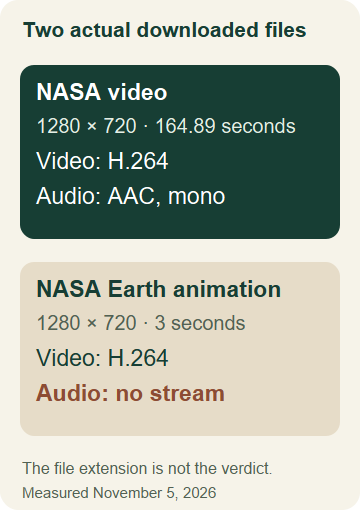
Measured from the product's downloaded files on November 5, 2026. The animation's filename ended in .gif; its detected container was MP4. These are two checked examples, not a claim about every download.
The silent animation didn't demonstrate lost sound. Its source file also had no audio track. Turning up the volume or converting that file to MP3 cannot recover an absent recording. The NASA video, meanwhile, demonstrated a successful audio-containing download. We didn't reproduce or repair a damaged, missing-audio version of that video.
The animation's filename also gives you a useful separate check. Your device may choose an image app because a name ends in .gif, even when the contents are a video container. Keep the original, verify the format, and explicitly open a copy with a player that supports that format if necessary. Changing an extension does not add an audio stream or repair damaged bytes. In this test we inspected the original file without renaming it, so the container result came from its contents rather than an assumed filename.
Download the specific item in Archivlyx
In the Archivlyx Twitter Video Downloader, paste the complete public post URL and select Start Now. Check the returned author and post text, then open the media preview. For the examples above, we used the specific status URLs rather than browsing an account and guessing which clip matched.
The current product preview of the specific NASA post. Opening this preview plays the source media; the download action saves a separate file.
Use the down-arrow download icon in the preview. The nearby paperclip is a different action; don't treat saving a reference to Favorites as a file arriving on your device. On the desktop preview we checked, the download arrow was at the upper left. The phone preview placed it near the lower right.

A native crop of the actual product controls. The two examples were downloaded through that preview action; the comparison above uses those resulting files.
Wait for the download to finish, then locate the new file by its name and modification time. Our larger video took longer to arrive than the small animation. Clicking again while it is still transferring can leave you comparing duplicate files instead of diagnosing the first one.
Our checks used an existing Archivlyx session and the available download allowance. If your current session shows a login, quota, or plan requirement, resolve that condition before counting a click as a completed download. A preview playing in the browser is separate evidence from a file saved to your device.
Check an audio stream without changing the file
If your player has media or codec information, look for an audio stream, not only the picture dimensions. Note the audio codec and channels if present. A video stream alone explains why that particular file cannot supply sound.
If you already use FFmpeg, the following inspection was part of our file check. Replace the example path with your downloaded file's path, keeping the quotes:
ffmpeg -i "clip.mp4"
Read the stream descriptions it prints. For our NASA video, one line identified Video: h264 and another identified Audio: aac. For the animation file, the output identified video but no audio line. This command has no output filename, so it prints information and then reports that an output file is required; that final message isn't itself evidence that the input is broken.
An audio stream can contain silence, so its presence alone doesn't prove that a particular passage should be audible. Our fuller check decoded the audio and measured a nonzero signal. You don't need that extra measurement to recognize the simpler case of a file with no audio stream at all.
Use the result to choose your next step
The source is an animation with no audio: keep it as a silent clip. If you need narration or music for an edit, that would be a new addition, not recovered sound from the source.
The source has sound, but your saved file has no audio stream: confirm that you downloaded the same post and media item. Keep the original file, then make one deliberate new download and compare it. If the discrepancy remains, report the specific post URL, filename, and stream result rather than repeatedly retrying or claiming the source was silent.
The saved file has audio, but you hear nothing: check the player's mute control, selected audio track, and device output. Try the same file in another compatible player. A working second player points toward playback or output settings; it doesn't require replacing the source post.
Keep the evidence small: the original URL, the exact saved file, and whether its stream list includes audio. Once those three agree, you can choose a useful next action instead of treating every silent moving picture as the same problem.