

When you scroll through Twitter (well, X if we’re being technical), profile pictures are often the first thing that catches your eye. Whether it’s a friend’s funny selfie, a brand’s sleek logo, or a celeb’s new look—you may want to save that image in high resolution. But Twitter doesn’t make downloading profile pics straightforward. That’s where Twitter profile picture downloaders come in.
💡 Curious about more Twitter tricks? You might also enjoy how to view private Twitter accounts in 2025—a complete guide that shows you what’s possible (and what isn’t) when it comes to locked profiles.
Why Download Twitter Profile Pics?
Let’s be real: sometimes you just need that profile photo off Twitter. Here are the most common reasons people use a downloader:
- Design & Branding – Social media managers often grab brand or influencer avatars for presentations, reports, or competitor analysis.
- Personal Use – Maybe your best friend changed their profile pic, and you want to save it as a memory.
- Professional Research – Recruiters, journalists, or analysts sometimes need crisp profile images for documentation.
- Better Quality – Twitter compresses images, but the right downloader helps you get a higher-resolution version.
In short, it’s about convenience, clarity, and keeping the images you need in the best quality possible.
How to Download Twitter Profile Pictures: 5 Best Tools You Should Try
1. MagicShot
MagicShot isn’t just a downloader—it’s an AI-powered tool that lets you save Twitter profile photos in high resolution while also enhancing them. Perfect if you need professional-looking avatars instead of grainy screenshots.
Pros:
- AI enhancement for sharper images
- Simple paste-and-download process
- Great for design, branding, and reports
Cons:
- Limited free usage; premium features require payment
- Overkill if you just need a quick download
Summary: Best for marketers, designers, or anyone who needs polished, high-quality avatars.
2. Inflact
Inflact is a full-scale social media toolkit that works across platforms (Twitter, Instagram, Facebook, and more). Beyond downloads, it offers scheduling, analytics, and automation—making it a one-stop shop for social media managers.
Pros:
- Multi-platform support
- Reliable high-resolution downloads
- Extra tools for scheduling and analytics
Cons:
- Not free; subscription required
- Interface may feel heavy if you only need profile pics
Summary: Ideal for professionals who handle multiple social accounts and want everything in one dashboard.
3. Snaplytics
Snaplytics started as a Snapchat analytics platform but evolved into a broader social insights tool. For Twitter, it can capture profile images as part of competitor tracking and influencer reporting.
Pros:
- Combines analytics with profile image saving
- Perfect for agency or campaign reporting
- Data-driven approach to social content
Cons:
- Analytics focus may be unnecessary for casual users
- Pricing is geared toward teams, not individuals
Summary: Best for agencies or data-savvy marketers who need profile pics alongside performance insights.
4. SnapTwitter
SnapTwitter is the definition of simple: paste a Twitter username, click download, and get the profile pic instantly. No bells and whistles—just pure functionality.
Pros:
- 100% free and super fast
- No sign-up required
- Easy for mobile and desktop use
Cons:
- Only does one thing (profile pic downloads)
- No bulk or advanced features
Summary: Perfect for casual users who just want a quick, no-nonsense way to save a Twitter avatar.
5. Apify
Apify is a powerful web scraping platform. With ready-made Twitter scrapers, you can download not just one, but thousands of profile images in bulk—great for research, academic projects, or influencer marketing.
Pros:
- Scales to hundreds or thousands of profiles
- Customizable with automation scripts
- Works for multiple data types (not just images)
Cons:
- Requires setup and some tech knowledge
- Overcomplicated for single downloads
Summary: Perfect for researchers, analysts, or growth hackers who need to work at scale.
Comparison of the 5 Twitter Profile Pic Downloaders
| Tool | Ideal For | Key Strengths | Limitations | Pricing Model | Ease of Use |
|---|---|---|---|---|---|
| MagicShot | Designers & marketers | AI-enhanced high-res downloads; simple UI | Limited free tier; paid for premium features | Freemium + Paid Plans | ★★★★☆ |
| Inflact | Social media managers | Multi-platform support; extra tools (scheduling, analytics) | Subscription only; too complex for basic needs | Paid Subscription | ★★★★☆ |
| Snaplytics | Agencies & data-driven teams | Combines analytics with profile downloads; strong reporting | Higher cost; less useful for individuals | Paid (Team Plans) | ★★★☆☆ |
| SnapTwitter | Casual everyday users | 100% free; instant downloads; no sign-up required | Single-purpose (avatars only) | Free | ★★★★★ |
| Apify | Researchers & growth hackers | Bulk scraping; customizable automation | Requires setup; technical knowledge needed | Freemium + Usage-based | ★★★☆☆ |
In-Depth Analysis
Looking at the comparison:
- Ease vs. Power: SnapTwitter wins on simplicity—it’s fast, free, and perfect for one-off avatar downloads. On the other end of the spectrum, Apify offers unmatched scalability, but only if you’re willing to invest time in setup.
- Quality vs. Quantity: MagicShot shines for quality, using AI to upscale avatars. Meanwhile, Apify handles massive datasets, making it the go-to for researchers.
- All-in-One Suites: Inflact and Snaplytics stand out because they aren’t just downloaders. Inflact is a Swiss Army knife for social media managers, while Snaplytics integrates profile photos into broader analytics workflows.
- Best Value: For most casual users, SnapTwitter gives the fastest ROI—it’s free, intuitive, and does the job with zero friction.
- Professional Edge: Agencies or marketers who rely on reporting and data visualization will find Snaplytics more valuable despite the price.
Beyond Downloaders: ArchivlyX’s Twitter Viewer
So far, we’ve compared the best tools for directly downloading Twitter profile pictures. But sometimes, you need more than just a quick download—you want the full context of a profile. That’s where ArchivlyX’s Twitter Viewer comes in. Instead of focusing solely on saving images, it gives you a smooth way to explore public accounts and tweets without logging in.
🔹 Twitter Profile Viewer — Get the Full Picture
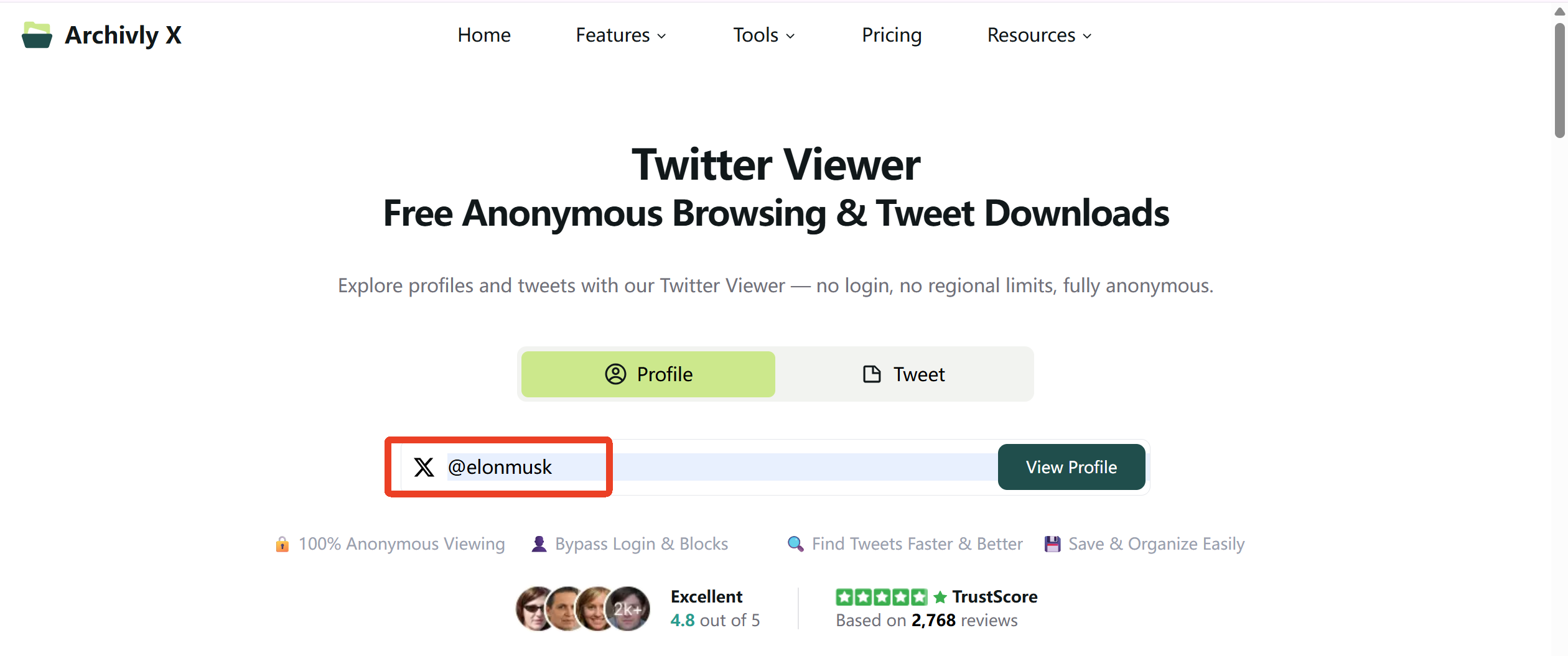
When it comes to profile photos, context matters. The Profile Viewer allows you to see not just an avatar, but the entire profile in one place.
What It Offers:
- Instant Access – View bios, avatars, and banners without login barriers.
- Media Gallery – Browse all shared photos, GIFs, and videos at once.
- Quick Search – Jump into any public account instantly.
Why It’s Useful:
- Recruiters can quickly review candidates’ profiles—avatars, bios, and posts—without leaving a trace.
- Marketers can grab both avatars and banners for brand research or competitive analysis.
- Casual users can explore accounts freely, without being forced to sign up.
👉 Compared to download-only tools, Profile Viewer gives a bigger picture—you don’t just save the avatar, you understand the profile behind it. And if you want to explore even more ways to browse Twitter without logging in, check out how to view Twitter without an account in 2025.
🔹 Twitter Tweet Viewer — Zero In on One Post
While Profile Viewer shows you the account, Tweet Viewer helps you focus on a single post.
What It Offers:
- Direct Tweet Access – Open any post without needing an account.
- Engagement Insights – See likes, reposts, and replies instantly.
- One-Click Downloads – Save images, GIFs, and videos in high resolution.
Why It’s Useful:
- Consultants can pull viral posts for presentations.
- Content creators can collect memes and media without poor-quality screenshots.
- Researchers can gather engagement stats for studies or reports.
🔹 Why ArchivlyX Complements Downloaders
ArchivlyX isn’t a replacement for profile picture downloaders—it’s a powerful companion. If you only need a quick avatar, tools like SnapTwitter or MagicShot get the job done. But if you want to understand the bigger picture behind a profile or a single tweet, ArchivlyX adds that missing context. For recruiters, marketers, and researchers, it’s the perfect bridge between downloading and analyzing.
👉 Ready to level up your Twitter toolkit? Use ArchivlyX’s Twitter Viewer today and start exploring profiles and tweets with zero hassle.


