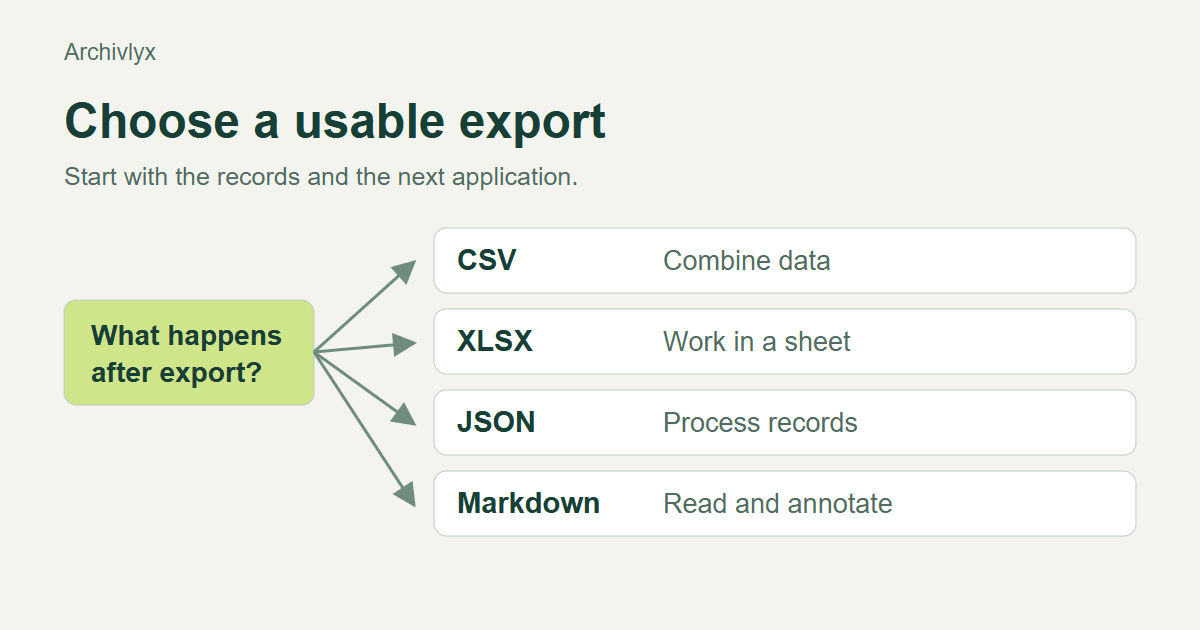
Choose a Twitter export by what you want to do next. CSV is a useful interchange file for a flat account list. XLSX is convenient when you want to work in a spreadsheet. JSON can preserve structured records, while Markdown is easier to read and annotate. First check which of those formats the particular product actually offers for the data you need.
That last step matters. A follower list, a collection of your bookmarks, and the archive of your own X account are different inputs. Finding a JSON option in one place does not establish that another exporter can produce it. Start with the object, then choose the file.
Start with the job after the download
Suppose you need to review accounts before a research project. You want columns you can filter, notes you can add, and a way to return to a profile. A spreadsheet file fits that job. If a script will combine the same rows with another dataset, a CSV may be the more portable choice.
Now change the task. You are preparing a written briefing from saved posts. A table of account metrics would not contain the passages you need. You need the post text, its original URL, its author and date, and your own reason for keeping it. Markdown may make that reading task easier, provided the tool offers a real Markdown export for that collection.
Ask three questions before selecting a format. What records will be included? Which fields do you need? What application will open the result? Those answers will eliminate more unsuitable options than a list of file extensions.
CSV and XLSX for an account list
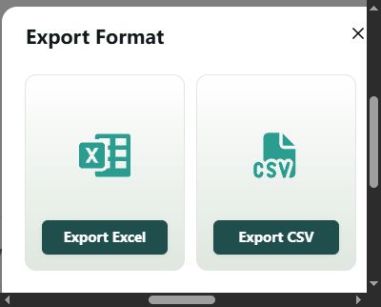
In our November 13, 2026 check, the Archivlyx Follower Exporter returned six follower records for the ArchivlyX account. The Export menu offered Export CSV and Export Excel. We obtained both files from that same result.
The CSV had six data rows and 16 columns. The XLSX workbook had the same row count and column headings. Those headings included Handle, Profile Url, Followers, Following, Location, and Joined. This was a small, dated sample. Use the total and exported count from your own result when assessing its scope.
The two files represented some values differently. CSV stored the verification and direct-message flags as the text true or false. XLSX stored them as Boolean values. Empty CSV fields became empty workbook cells. These are normal differences between text and typed spreadsheet data, but they matter when you write a filter or compare files.
Choose XLSX when you want to start in a spreadsheet and keep its worksheets, cell types, and later annotations together. Choose CSV when the next application expects a delimited text file. Keep the original download before saving a working copy, especially if an application proposes changing its encoding or delimiter.
What CSV leaves to the importer
A CSV contains records and separators. It does not carry a workbook's cell formatting or several worksheets. An importer must decide how to interpret the text it receives.
A comma inside a quoted location should stay inside one cell. A line break inside quoted text should stay with its record. A non-Latin place name should survive the chosen encoding. In our six-row export, one location contained a comma and another contained Japanese characters. Those provided two practical checks before using the file.
Inspect the import preview rather than assuming that a familiar file icon means the columns are correct. If the whole row appears in one column, revisit the delimiter. If characters look damaged, check the encoding against the untouched source. If an identifier is present, treat it as an identifier when importing it. Microsoft documents the precision and conversion issues that can affect long numbers in Excel.
Our follower sample did not contain an account-ID column, and its Joined fields were empty. We therefore could not use it to prove that this exporter preserves IDs or supplies joining dates. Check the fields that are actually in your file before planning an analysis around them.
JSON for structured records
JSON describes objects, arrays, strings, numbers, and other values. It can represent a post with nested media or other associated records without squeezing every detail into one table row. That can be useful when software will process the data.
The benefit depends on the schema. A .json extension alone does not tell you which fields were included, whether media are embedded or linked, or how much history was retrieved. Open a small record and identify the fields you expect before committing to an import process.
The official X account archive is a separate account-data workflow. Its scope and packaging should be checked against X's current instructions. It should not be confused with a public follower export or with a third-party bookmark collection.
Markdown for reading and annotation
Markdown is a useful working format when the next step is reading, quoting, and adding commentary. A source URL can remain next to a passage, and your notes can live below it. It is less convenient for numeric filters across thousands of account rows.
An exported note still needs inspection. Does it contain the text you intended to keep? Does each item link to its original post? Are images saved locally or represented by remote URLs? A readable note and an offline media collection have different requirements.
Archivlyx's current pricing information describes CSV, JSON, and Markdown exports for the paid bookmark plans. That is a different product path from the public account-list exporter checked above. We did not sync or export a bookmark collection in this test. If that is your task, begin at the Bookmarks Manager, check its setup and plan conditions, and inspect the actual output you obtain.
Keep one original and one working copy
Name the original with the target account, relationship direction, capture date, and format. Add analysis columns in a separate working file. This lets you distinguish what the source supplied from what you calculated or wrote later.
Before choosing a format for the next run, try opening the current sample in its destination application. Confirm a text field, a numeric field, a blank field, and a URL. If a field essential to your job is missing, changing the extension will not create it.
For a concrete next task with a spreadsheet, the follower-count sorting guide shows how to order a list while keeping its account fields together.
The useful choice is the file that preserves the records you need and opens cleanly where the work continues. For an account review, that may be CSV or XLSX. For structured processing or a reading notebook, assess the actual JSON or Markdown output from the relevant workflow. The format decision follows the task all the way to the usable result.