You saw a picture of two galaxies on X and want to send the original to a friend. You remember Hubble posted it and a few words from the caption. Search X by account and phrase, then open the post you find in Archivlyx to make sure you have the one you meant to share.
Start with the account and one clue
Sign in to X on the web and open Advanced Search. Put the handle under From these accounts. For words you remember clearly, try the exact-phrase field. If you only remember the subject, try its most distinctive term. Select Search to see the results.
Try @NASAHubble and the phrase “pretty dynamic duo.” In our November 24 check, those two fields found Hubble’s Arp 140 post under Top. Try that tab first before changing the query. The same search showed no matches under Latest.
If the results are crowded, open Dates and set From and To. Adding January 1, 2024 in From and January 31, 2024 in To kept the same Hubble post in Top during our check. Use the month the post was written as your starting point. If you’re unsure of the wording, try a distinctive word first and leave the date open. Change one filter at a time so you can tell which one helped.
Pick filters that match what you remember
The account is the strongest clue in this example. The phrase “pretty dynamic duo” might appear in several replies or reposts, so keep the author filter in place while you adjust the words. If all you remember is a display name such as Hubble, check the handle on the profile first. There can be a difference between the account that posted the photo and the account that put it in front of you.
What you remember | Where to start in Advanced Search |
|---|---|
The account and a short, distinctive phrase | Enter the account in the author field and put the phrase in the exact phrase field. |
The account and a topic | Enter the account and one unusual word associated with the topic. Leave the exact phrase field empty. |
The account and the month you saw it | Try a date range around that month. Widen it if you may have seen a repost of an earlier post. |
Someone shared a link to it | Open the link first. Once it leads to a specific post, you can go directly to the viewing step. |
The date filter is most useful after you have a plausible account and keyword. You might have seen an old photo yesterday because someone shared it again. Searching for posts authored yesterday would miss it. In the Hubble example, the original post dates to January 2024. Let the post date and caption help you identify the result, even when the copy you saw appeared much later.
Check the post in Archivlyx before you share it
Copy the result’s full post URL. It should contain
/status/and a post ID. To try the viewing step immediately, copy this public Hubble post.Open the Archivlyx Tweet Viewer, select Tweet, paste the URL, and choose Start Now.
Check the author handle and the text in the result. In the November 24 check, Archivlyx returned
@NASAHubbleand the caption opener “Arp 140 is a pretty dynamic duo.” When both clues match what you remember, send the original post URL to your friend or keep it in your own notes.
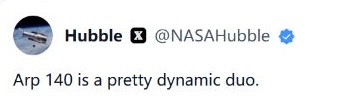
The public Hubble result in Tweet Viewer. Look for @NASAHubble and the phrase “pretty dynamic duo” before you copy the original link.
If you only have the account’s profile URL, go back to the search results and open the individual post. If you only have an image of the feed, start with finding the original tweet from a screenshot.
You can get a plausible-looking result and still have the wrong post. Compare what each candidate actually says. If one caption is an official description of the galaxy pair and the other simply points to a photo, use the one that matches the words you remember. The key evidence is the combination of author handle, caption, and individual post link. A similar preview image by itself gives you less to work with.
If the Viewer doesn't return a post, open the original URL on X and check it directly. A correct-looking link may still point to a post that is unavailable. If you can read the original there, compare its author and caption before sharing it.
Keep searching when the first pass misses
If Latest is empty, check Top with the same query. If Top is also empty, remove the exact phrase and keep the handle. Next, try one less common word from the caption. Widen or remove the date range last if your date was a guess. If the author may have been someone who shared the photo, run a separate search without the author filter and look for a result that links back to the original. These changes give you distinct ways to recover from a search with the wrong wording or date.
If you cannot use Advanced Search, try a regular web search with the handle and a distinctive phrase. A result can point to an article with an embedded post. Open the embedded link, then look for the individual post ID and compare the caption before you share it. If you find the account but no matching post, keep the account and phrase in a note so you can retry without starting over.
For the full list of fields, see X Help on Advanced Search.